In an era where AI plays a pivotal role in daily life, developing an AI chatbot has become a priority for many businesses seeking to automate customer interactions. However, traditional chatbot development often requires technical expertise, such as coding or complex system configurations. This guide introduces no-code solutions using popular tools like n8n and Make.com (formerly Integromat), comparing their pros and cons.
1. n8n: Build AI Chatbot with Visual Workflow
n8n is an open-source automation tool that lets users create workflows via drag-and-drop interfaces — no coding required.
Steps to Build a Chatbot
Connect to an AI Model API: n8n supports connecting to popular AI models, such as OpenAI, Google Vertex AI, or Hugging Face. You just select the relevant “node” (a building block in n8n), enter your API Key, and you’re ready to go. You can also use OpenRouter to access popular models like Qwen, Deepseek, or ChatGPT.
Set Up a Trigger: Use nodes to receive messages from platforms like Slack, Telegram, or Facebook Messenger.
Design the Chatbot’s Logic: Create conditions or response paths using nodes like “IF” or “Switch”. These help your chatbot understand different types of questions and respond appropriately.
Test and Refine: Test your chatbot by simulating real-life scenarios and adjust the workflow as needed.
Advantages of n8n
Open-Source: You can fully customize it to suit your needs.
Free for Self-Hosting: If you install it on your own server, there are no extra costs.
Supports Many APIs: Easily connects to external services like CRM systems, email, or social media platforms.
Good for Intermediate to Advanced Users: You have detailed control over every step of the process.
Disadvantages of n8n
Requires Some Technical Knowledge: Even though you don’t need to code, you should understand how APIs work and how to set up servers.
Complex Installation: If you want to host it on your own server, the installation process might take time and effort.
2. Make.com: Build an AI Chatbot with Drag-and-Drop
Make.com (formerly Integromat) is an automation tool that focuses on ease of use, making it perfect for beginners who want to create a chatbot without coding.
Steps to Build a Chatbot
Choose a Module to Receive Messages: Select the platform you want to use, such as Telegram, Slack, WhatsApp, or even Line (using Line Messaging API Webhook).
Connect to an AI Service: Make.com has ready-made modules to connect to popular AI services like OpenAI, Claude, or OpenRouter.
Design the Response Path: Use modules like “Router” or “Filter” to separate different types of questions and set up appropriate responses.
Test and Publish: Test how your chatbot works and then publish it to the platform you chose.
Advantages of Make.com
Easy to Use: The user-friendly interface makes it quick for beginners to create a chatbot.
No Installation Needed: It’s a cloud-based service, so you don’t need to set up your own server.
Supports Many External Services: Easily connects to various platforms.
Great for Beginners: You don’t need any technical background to get started.
Disadvantages of Make.com
Costs Money: While there is a free plan, the number of API calls and workflows is limited, and you may need to pay for premium plans.
Limited Customization: Compared to n8n, you may find fewer options to customize workflows.
Depends on Supported Services: If Make.com doesn’t support a specific service, you may need to find workarounds.
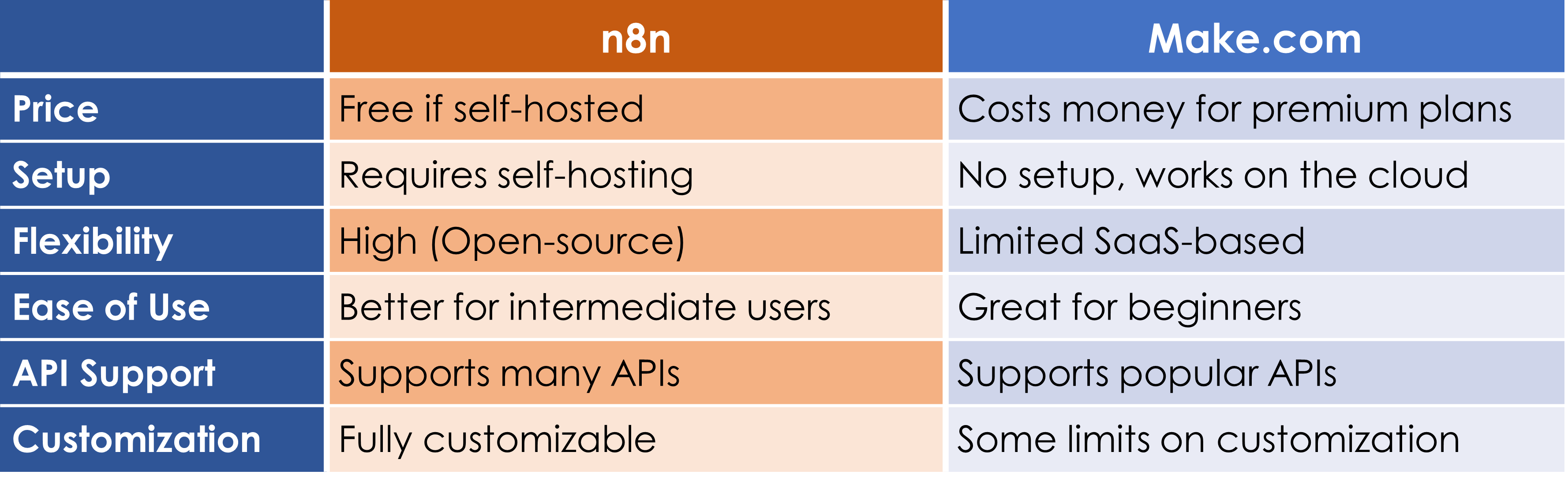
Comparison of n8n and Make.com
When to use Each Tool
If you have some technical knowledge and want a highly flexible solution for creating an AI Chatbot, n8n is a great choice. It allows full customization and is free if you host it on your own server. However, if you’re a beginner who wants to create a chatbot quickly and easily, Make.com is the better option, thanks to its user-friendly interface and no need for server setup.
Choose n8n for maximum flexibility and control, especially if you have technical expertise.
Choose Make.com for simplicity and speed, ideal for beginners or small-scale projects.
No-code AI chatbot development is now accessible to everyone, empowering businesses to automate interactions effortlessly.
For more information and any suggestions, chat with us @Davoy.tech.